
What Software Do Gyms Use to Record Membership Details? 8 Options Compared
October 17, 2026
A member changes their card on file. Another freezes their membership for a month. Someone else signs a waiver, books Tuesday's class, then stops showing up for two weeks.
If those updates live in four different places, your staff does not really have a membership database. They have four versions of the truth.
Gyms typically use gym management or membership management software to record membership details. These platforms give every member a profile connected to their plan, payments, attendance, bookings, and other records. Rather than keeping contact details in a spreadsheet and payments in another tool, staff can see the relationship in one place.
Many systems can also connect that profile to door access, workout performance, belt progression, communication, rewards, or lead management. The important question is not simply whether software can store a name and phone number. It is what your gym can do with the record once it exists.
This guide compares eight platforms, including Monstro-X, and explains how to choose based on the work your staff actually does.
What Membership Details Should Gym Software Record?
Think about the conversation your front-desk staff has when someone asks, "Can you check my membership?" They usually need more than a name and renewal date.
| Information | Examples | Why it matters |
|---|---|---|
| Personal details | Name, email, phone, emergency contact | Helps staff identify and contact the member |
| Membership details | Plan, start date, renewal date, status, freezes | Shows what the member is entitled to |
| Billing information | Payment status, invoices, transaction history | Helps staff resolve billing questions |
| Agreements | Waivers, contracts, signed documents | Keeps relevant paperwork with the account |
| Attendance | Check-ins, last visit, class history | Shows how often the member participates |
| Bookings | Classes, appointments, no-shows | Connects the account to the schedule |
| Staff notes | Goals, preferences, follow-up notes | Gives coaches and staff useful context |
| Family relationships | Parent, child, shared billing account | Helps manage youth and family programs |
| Progress | Belt rank, skills, milestones, workout results | Supports progress-based training programs |
| Access rights | Allowed doors, locations, and times | Matters for 24/7 and multi-location gyms |
Not every gym needs every field. A 24/7 strength gym may care more about door permissions than belt progression. A BJJ academy may need separate student progress records under one family billing account. A Pilates studio may focus on class packages, bookings, and payment history.
The member record should reflect how your gym actually operates.

8 Gym Software Platforms That Record Membership Details
The platforms below are presented by use case, not as a universal ranking. Product features and plan availability can change, so confirm your required workflows during a demo.
| Software | Member records connect with | Worth evaluating if you run |
|---|---|---|
| Monstro-X | Memberships, attendance, billing details, communication, rewards, referrals, community | A gym or class-based business that wants member engagement alongside administration |
| Gymdesk | Memberships, attendance, billing, documents, notes | An independent gym or martial arts school seeking connected day-to-day records |
| PushPress | Membership plans, waivers, check-ins, payments, scheduling | A functional fitness or class-based gym |
| Wodify | Member profiles, billing, waivers, attendance, performance data | A performance-focused or functional fitness gym |
| Zen Planner | Memberships, billing, attendance, family accounts, belt progress | A martial arts school or another progression-based business |
| GymMaster | Memberships, billing, attendance, bookings, door access | A 24/7 or partially unattended gym |
| Mindbody | Client profiles, memberships, purchases, visits, bookings, reporting | A fitness or wellness business with broad scheduling needs |
| Exercise.com | Member management, check-ins, payments, bookings, waivers, workout delivery | A training business that wants operations and programming in one platform |
1. Monstro-X
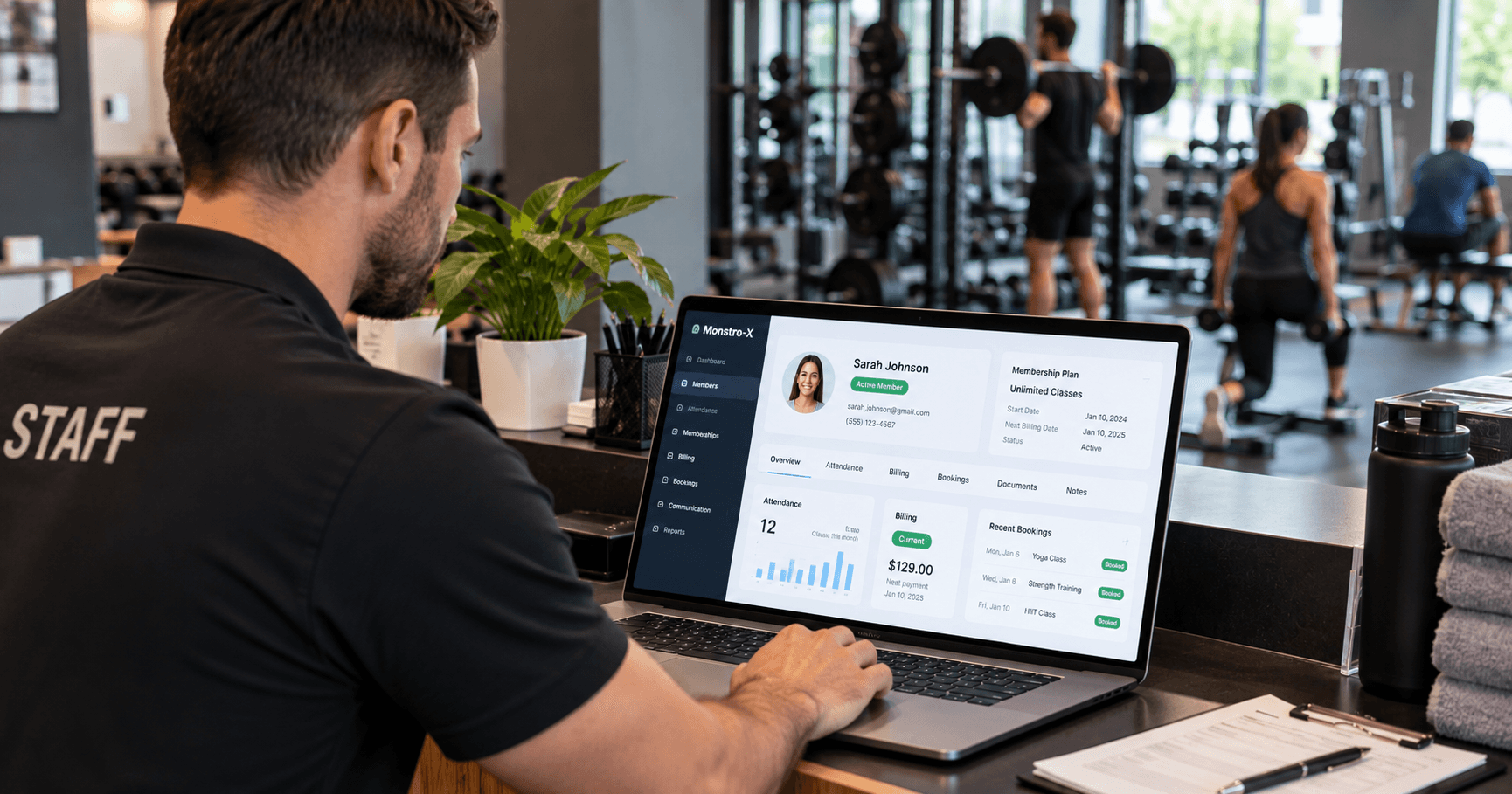
Monstro-X gym management software connects membership and billing details with attendance, analytics, reminders, rewards, referrals, and community features.
That makes it relevant when you want a member record to do more than show "active membership" and "payment received."
Imagine Sarah normally trains three times a week. Her membership is still active and her payments are current, but she has attended only once in the last three weeks. Nothing in a basic billing record looks wrong. An attendance and engagement system helps staff notice the change while there is still time to check in with her.
Monstro-X emphasizes that wider member relationship through attendance tracking, automated reminders, achievements, leaderboards, referral tools, and community features.
Best fit: Group-class gyms, martial arts schools, and studios that want their member records connected to participation and engagement.
What to check: Have the team demonstrate the exact billing rules, member data fields, reporting, integrations, and follow-up workflows your facility needs. If physical door-access hardware is the central requirement, compare an access-focused system as well.
2. Gymdesk
Gymdesk's member accounts bring memberships, attendance history, billing, documents, and notes into an individual record. Its member app also supports account and payment-detail updates, documents, and other self-service tasks.
A member signs up, gets a plan, signs a waiver, starts checking in, and makes payments. Staff can follow that history without maintaining a separate spreadsheet for each step.
Best fit: Independent gyms and martial arts schools that want connected member records, billing, documents, and routine operations.
What to check: Ask for a demonstration of your specific marketing, retention, and reporting needs. Gymdesk also documents the data that can be exported, which is useful if you plan to migrate later.
3. PushPress
PushPress Core brings memberships, waivers, check-ins, billing, scheduling, and reporting together. Its member profiles include contact details, notes, attendance, and payment status.
That matters because gym memberships are recurring relationships. The same person books classes, changes plans, freezes their account, updates a card, and returns next month. Your software should handle those changes without forcing staff to rebuild the member's record.
Best fit: CrossFit, functional fitness, strength, and other class-based facilities.
What to check: Confirm which PushPress products or plans are needed for the full setup you want, not just the introductory features.
4. Wodify
Wodify membership management combines member information with billing, waivers, attendance, and performance data. The shared record can tell a coach not only that a member attended Monday, but also what they did in training.
That extra layer matters when workout performance is part of the service. A coach can see a member's participation alongside their training history rather than opening a separate programming app.
Wodify also offers lifecycle messages for onboarding, milestones, and lead nurturing.
Best fit: Functional fitness and performance-focused gyms that want membership and workout activity connected.
What to check: Make sure you will use the performance tools. If you only need payments and check-ins, assess the day-to-day administration on its own terms.
5. Zen Planner
Zen Planner's martial arts software combines membership management with family billing, attendance, and belt or rank progression.
Consider a parent paying for two children at a karate school. Each student has a different belt, attendance history, and testing schedule. The family needs connected billing, but the children still need individual training records. Generic member databases can make that arrangement awkward.
Zen Planner is built for those family and progression workflows.
Best fit: Martial arts schools, BJJ academies, and other businesses where rank, skills, testing, and family relationships matter.
What to check: See how the system handles your exact ranking structure, promotion requirements, family billing, and student history. A conventional gym may not need the progression features.
6. GymMaster
GymMaster's member access system connects door permissions to a member's account and membership benefits. Access can depend on the plan, allowed hours, and account status.
That connection is important for an unattended gym. If someone freezes their membership or a payment fails, staff should not have to reconcile a billing spreadsheet with an unrelated door-access database.
Best fit: 24/7 gyms and facilities where membership status needs to control physical access.
What to check: Ask about compatible hardware, installation, what happens during an internet outage, and how freezes or failed payments affect access.
7. Mindbody
Mindbody connects client management with scheduling, payments, visits, and business reporting. Its reporting documentation describes access to client history, past visits, purchases, memberships, and other account details.
That breadth can help a business offering group classes, private sessions, retail, and several locations. For a small gym that needs only membership plans, payments, and check-ins, those wider tools may be less important.
Best fit: Fitness and wellness businesses with broader client, booking, payment, and reporting needs.
What to check: Compare the specific plan and add-ons needed for your workflows. Test routine staff tasks, not just the sales dashboard.
8. Exercise.com
Exercise.com gym management software combines member management, check-ins, bookings, payments, waivers, reporting, branded apps, and workout delivery.
A sports-performance facility might want to know who an athlete is, what package they bought, when they attended, and what program they are following—all from connected software.
Best fit: Training businesses that want gym operations and workout programming delivered through the same branded experience.
What to check: Decide whether the custom app and programming capabilities solve a real problem for your business. If not, compare the simpler operational workflows first.
The Member Record Should Connect the Whole Business

A member database is useful because one action can update the rest of the system. Here is an example of what that could look like:
- Signup: The member enters their details once.
- Member profile: Staff can see the new account and contact information.
- Membership: A plan, status, renewal date, and entitlements are attached.
- Payments and agreements: The payment method is connected securely, and the waiver is signed.
- Bookings and check-ins: Class reservations and visits update the member record.
- Attendance history: Staff can see the person's normal training pattern.
- Signals: An absence, failed payment, expiring plan, or milestone becomes visible.
- Action: Staff or an approved automation follows up using the same account history.
The difference is not simply having more data. It is making sure the data stays connected when a real member changes something.
Can a Gym Use Excel or Google Sheets Instead?
A new gym with 15 founding members may be able to manage names, contact details, plans, and payment status in a spreadsheet.
The problem appears when each row has to control several other processes. At 250 members, a plan change might require updating the spreadsheet, adjusting recurring billing, changing class entitlements, and updating access permissions. Every disconnected system creates another task for staff.
A spreadsheet has not failed because it cannot hold 250 rows. It has become awkward because the rows do not automatically drive the rest of the business.
If your gym is small and its processes are simple, that manual work may still be manageable. As memberships and services grow, connected software becomes more useful.
What Is the Difference Between a Gym CRM and Membership Software?
A gym CRM generally helps manage prospective customers and the sales relationship: inquiries, lead sources, trial bookings, follow-up, and enrollment.
Membership management software focuses on what happens after enrollment: active plans, billing, attendance, bookings, waivers, access, and member history.
Many gym platforms combine both. Ideally, when a trial student becomes a paying member, their existing lead profile becomes their member record. Your staff should not have to copy the same contact information into a second system.
What Should You Test Before Choosing Gym Membership Software?
Do not choose software just because one vendor has a longer feature list. Ask each provider to demonstrate the situations your staff deals with every week.
Change a Membership
A member wants to move from two classes a week to unlimited training. How many steps does that take? Does the next bill adjust correctly? Can staff see the change later?
Freeze an Account
Someone is traveling for six weeks. Can you freeze their plan, adjust billing or access as needed, and see when the freeze ends?
Fix a Failed Payment
Can staff identify the failed payment quickly? Can the member update their own payment method? What reminders or retries are available, and where is the history recorded?
Find Someone Who Stopped Attending
Ask the salesperson to demonstrate this specific situation:
"Sarah normally visits three times a week, but she has barely trained this month. How would my staff notice?"
Do not settle for a promise that a report could probably be built. Have them show you.
Export Your Member Data
Ask exactly what you can take with you if you ever switch platforms: contact details, memberships, attendance, invoices, notes, documents, and progression records. Years of business history will live inside your software; understand which parts can be exported.

Be Careful With Sensitive Member and Payment Data
Member records may contain contact details, signed agreements, billing information, and sensitive staff notes. Ask vendors about account security, staff permissions, backups, exports, and the payment provider they use.
The PCI Security Standards Council says cardholder-data retention should be limited to what is necessary for legal, regulatory, or business purposes, and that sensitive authentication data must not be retained after authorization.
In everyday terms, a coach should not need access to somebody's full card number to mark them present in class. Give each staff member access to the information needed for their role, and confirm how payment information is handled.
So, What Software Do Gyms Use to Record Membership Details?
Most gyms use gym management or membership management software as the central record for member information. Which platform makes sense depends on what you need that record to do.
Gymdesk covers connected membership, attendance, billing, and document records. PushPress is built around recurring memberships and group-class operations. Wodify and Exercise.com connect member administration with workout-related features. Zen Planner supports martial arts progression and family relationships. GymMaster gives particular attention to physical access. Mindbody spans broader client, scheduling, and business-management needs. Monstro-X connects memberships and attendance with communication, rewards, referrals, and community features.
Take three or four real situations from your gym and ask each vendor to walk through them. You will learn more from seeing a membership change, a failed payment, an attendance drop, and a data export than from counting features on a product page.
Frequently Asked Questions
What Is Gym Membership Software?
Gym membership software keeps member profiles, plans, billing, attendance, and related business records organized. Depending on the platform, it may also include scheduling, waivers, communication, reporting, access control, or CRM features.
What Details Do Gyms Keep About Members?
Common records include contact information, membership type and status, billing history, attendance, bookings, signed agreements, staff notes, and family relationships. Some businesses also track door access, workout results, skills, or belt rank.
Do Gyms Still Use Spreadsheets for Membership Records?
Some small and newly opened gyms do. Spreadsheets can work when the member count and operating complexity are low, but they do not automatically connect account changes with billing, bookings, access, and attendance.
Does Gym Software Store Credit-Card Numbers?
Payment handling varies by platform and provider. Ask whether the payment service stores card details securely and what, if any, cardholder information your gym can access. Do not store card details in member notes or spreadsheets.
Is a Gym CRM the Same as Membership Software?
Not exactly. CRM tools focus primarily on leads and sales follow-up; membership management focuses on active accounts, plans, billing, and attendance. Many gym platforms offer both.
Which Gym Software Should I Choose for Membership Details?
Start with the workflows your gym uses every day: signing up a new person, changing a plan, collecting payment, recording attendance, freezing an account, and exporting data. Then compare vendors based on how they handle those specific tasks.
Sources & References
- Monstro-X — Gym Management Software
- Gymdesk — Member & Visitor Accounts
- Gymdesk — Reports & Data Exports
- PushPress — Core Gym Management Software
- Wodify — Membership Management
- Zen Planner — Martial Arts School Software
- GymMaster — Member Access
- Mindbody — Business Reporting & Analytics
- Exercise.com — Gym Management Software
- PCI Security Standards Council — Cardholder Data Retention FAQ