
Top 10 Best Yoga Studio Software Options
September 24, 2026
Running a yoga studio gets messy surprisingly fast.
A few weekly classes can be managed with a calendar and a payment link. Add memberships, class packs, waitlists, substitute teachers, workshops, recurring billing, and students who disappear for three weeks, and suddenly the software matters a lot more.
Your students expect to book classes easily, manage their memberships, and receive reminders without having to call the front desk.
Meanwhile, you need to know which classes are filling up, which memberships are expiring, which payments have failed, and which regular students have stopped showing up.
The right yoga studio software should make all of this easier without creating more administrative work for your team.
But not every platform is built for the same type of business.
A solo yoga instructor teaching six classes a week needs something different from a three-location yoga brand managing hundreds of members and dozens of instructors.
Some platforms focus on scheduling and payments. Others include marketing automation, community features, member retention tools, and detailed reporting.
This guide compares 10 yoga studio software options based on their features, pricing, strengths, limitations, and the types of studios they are designed to serve.
Disclosure: This article is published by Monstro-X, and Monstro-X is included as one of the software options. The comparison also covers competing platforms and situations where another product may be more suitable.
Pricing information reflects publicly available information reviewed in September 2026. Prices, features, promotions, and plan inclusions can change. Confirm the final cost with each provider before purchasing.
The 10 Best Yoga Studio Software Options at a Glance
If you want to narrow your options quickly, start with this comparison.
| Software | Best Fit | Starting Price | Main Strength |
|---|---|---|---|
| Monstro-X | Studios focused on member engagement, community, and retention | Free plan; paid plans from $159/month | Membership management, attendance, rewards, referrals, and community |
| Mindbody | Studios wanting comprehensive management and marketplace visibility | From $79/month per US location | Scheduling, payments, marketing, reporting, and client discovery |
| WellnessLiving | Studios wanting booking, marketing, and loyalty tools together | From $69/month | Scheduling, automated marketing, rewards, and client management |
| Momence | Studios offering classes, workshops, and hybrid experiences | Custom pricing | Flexible booking, memberships, courses, and marketing |
| Vagaro | Small studios offering yoga alongside other wellness services | From $30/month before promotions | Affordable entry pricing, appointments, and marketplace exposure |
| ABC Glofox | Boutique fitness brands and growing multi-location studios | From $99/month; custom quote required | Branded member experience and fitness business management |
| TeamUp | Established class-based studios | Usage-based; $189/month for 101–200 active customers | Scheduling, memberships, staff management, and reporting |
| OfferingTree | Independent instructors and boutique yoga studios | Individual plans from $26/month when billed annually | Website, booking, marketing, and on-demand content |
| Momoyoga | Yoga instructors and studios wanting yoga-specific software | Free plan available | Simple yoga class scheduling, memberships, and student booking |
| Zen Planner | Membership-focused studios needing structured billing and reporting | From $99/month | Membership administration, recurring billing, and reporting |
Important: These are starting prices or representative public pricing examples, not guaranteed quotes for your business.
The monthly subscription is only one part of the cost. Payment processing fees, additional staff accounts, branded apps, messaging, and other add-ons can change the final amount considerably.
How We Evaluated These Yoga Studio Software Options
We looked at the features that affect how a yoga studio operates every day.
The aim was to identify what each platform offers, where it may be useful, and what owners should check before committing.
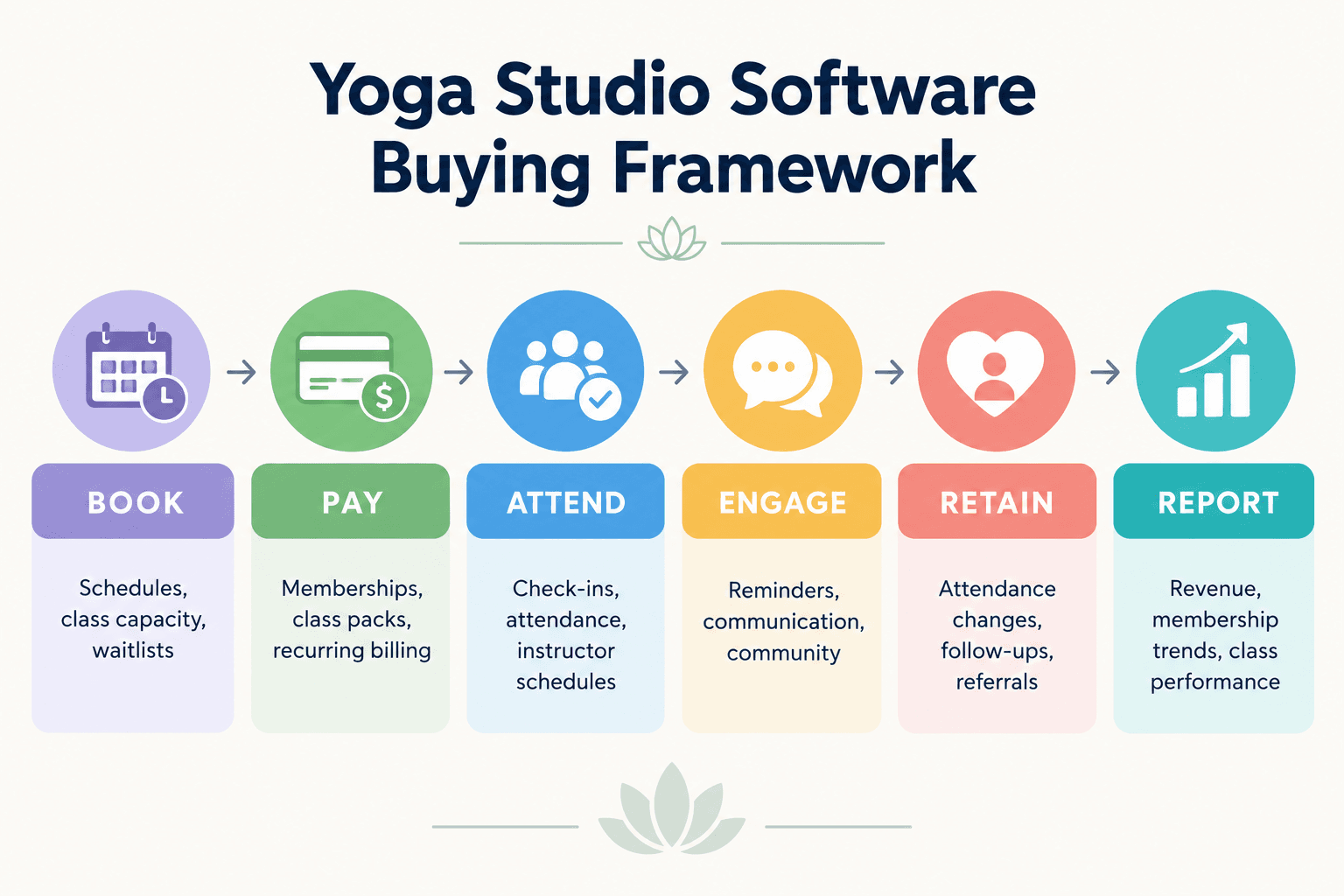
The comparison covers six areas:
| Evaluation Area | What We Looked For |
|---|---|
| Class scheduling | Online booking, class capacity, waitlists, recurring schedules, and instructor management |
| Memberships and payments | Membership plans, class packs, recurring billing, payment processing, and failed payment handling |
| Member experience | Mobile booking, account management, reminders, and communication |
| Marketing and retention | Lead management, automated follow-ups, attendance tracking, loyalty, and referrals |
| Business management | Staff permissions, reporting, multiple locations, and operational workflows |
| Pricing and flexibility | Subscription costs, add-ons, processing fees, and whether the platform can support different business models |
This is a feature-based editorial comparison using publicly available product information.
It is not the result of independently testing every platform in a live yoga studio.
Individual software recommendations below describe suitable use cases rather than claiming that one platform will perform better than every alternative.
Top 10 Best Yoga Studio Software Options
1. Monstro-X
Best fit: Yoga studios that want to manage memberships while giving more attention to community, member engagement, and retention.
Monstro-X approaches studio management as more than a booking and payment problem.
Of course, your students need to reserve classes, manage memberships, and pay for their sessions.
But what happens after they join?
Imagine a student who normally attends yoga three times a week.
For the first month, she is consistent. Then work gets busy, and she starts attending once a week. Eventually, she stops coming altogether.
If you have 30 members, you might notice that yourself.
If you have 300, remembering everyone's attendance patterns becomes much harder.
Monstro-X includes attendance tracking, member communication, reminders, achievements, rewards, referrals, and community features alongside the usual membership management tools.
That gives studios a way to organize both the administrative side of the business and the activities that help members stay connected.
Main Features
| Feature | How It Helps Your Yoga Studio |
|---|---|
| Membership management | Manage membership plans, billing information, and member records |
| Class management | Organize classes and related member activity |
| Attendance tracking | Monitor visits and identify changes in attendance |
| Automated reminders | Send reminders and follow-up communications |
| Points and rewards | Recognize participation and member milestones |
| Community features | Give members ways to connect and interact |
| Referral management | Organize member referral activities |
| Mobile member app | Give students access to supported member-facing features |
| Reporting and analytics | Review attendance, memberships, and business activity |
| Digital courses and events | Manage additional learning experiences and studio activities |
For a yoga studio, engagement tools should support the experience you want to create.
Some students may enjoy attendance milestones, group challenges, and community activities. Others simply want a peaceful place to practice.
The software gives you the tools, but your studio still needs to decide how to use them.
Monstro-X Pricing
Monstro-X currently publishes three subscription plans:
| Plan | Monthly Price | Intended Business Size |
|---|---|---|
| Free | $0 | Studios with fewer than 25 members |
| Basic | $159 | Studios with approximately 25–100 members |
| Growth | $299 | Studios with more than 100 members |
The Free plan lists payment processing fees of 4.9% + $0.30 per transaction.
Basic and Growth list 2.9% + $0.30 per transaction.
Email and AI usage may create additional charges.
You can review the available plans and their included features on the Monstro-X pricing page.
Monstro-X Pros and Cons
| Pros | Cons |
|---|---|
| Combines studio management with community and engagement features | A solo instructor may not need the full engagement feature set |
| Attendance information can support member follow-up | The Free plan has higher published processing fees |
| Includes rewards, achievements, and referral tools | Studios need to decide how to use gamification without distracting from their teaching approach |
| Offers a free subscription tier for small businesses | Does not offer a consumer discovery marketplace comparable to Mindbody |
| Supports memberships, payments, communication, and reporting | Complex multi-location requirements should be confirmed during a demo |
Why Monstro-X May Be a Good Fit
Monstro-X is worth considering if your studio already has a steady flow of students but struggles to keep them engaged over time.
You may know that people enjoy your classes, yet you still see memberships canceled after two or three months.
Software alone will not solve that problem.
You need to understand why students leave, identify attendance changes early, give instructors responsibility for follow-up, and make it easier for members to build a routine.
Monstro-X provides tools that can support those processes while also handling day-to-day studio management.
For more on the underlying approach, read our guide on how to increase membership retention.
Visit: Monstro-X Yoga Studio Software
2. Mindbody
Best fit: Yoga studios that want comprehensive business management software with access to an established fitness and wellness marketplace.
Mindbody is an established platform serving fitness, wellness, and beauty businesses.
For yoga studios, it brings scheduling, memberships, payments, staff management, marketing, and reporting into one system.
Its consumer marketplace is an important part of the offering.
Students can discover participating studios and book classes through the Mindbody app.
That gives a studio another way to reach people who may not already know its name.
If your business operates in a busy city with several competing yoga studios, that additional discovery channel may be relevant to your marketing strategy.
However, marketplace visibility does not guarantee new paying members.
You still need a compelling class schedule, clear pricing, positive student experiences, and a process for turning first-time visitors into regulars.
Main Features
| Feature | How It Helps Your Yoga Studio |
|---|---|
| Online class scheduling | Manage recurring classes, appointments, and workshops |
| Memberships and class packs | Sell different pricing options |
| Integrated payments | Collect payments and manage recurring billing |
| Mindbody marketplace | Make your studio discoverable to consumers using the app |
| Waitlist management | Help fill newly available class spaces |
| Staff management | Manage instructor schedules and business operations |
| Marketing tools | Support client communication and promotional activities |
| Reporting | Monitor studio activity, sales, and business performance |
| Website booking | Allow students to book through your business website |
Mindbody Pricing
Mindbody currently advertises US pricing starting at $79 per month per location.
The final cost depends on the selected plan and any additional products or services your business needs.
Confirm the price of advanced marketing features, branded app options, payment processing, and other add-ons before purchasing.
Source: Mindbody pricing information.
Mindbody Pros and Cons
| Pros | Cons |
|---|---|
| Broad range of yoga studio management tools | Costs can increase with higher-tier plans and add-ons |
| Consumer marketplace offers an additional discovery channel | Marketplace visitors may not become recurring members |
| Supports scheduling, payments, reporting, and staff management | Smaller studios may not need every available feature |
| Suitable for businesses with different class and service offerings | Owners should review the complete pricing proposal before committing |
Why Mindbody May Be a Good Fit
Mindbody is worth considering if your studio needs comprehensive operational tools and wants to participate in an established fitness and wellness marketplace.
It may also suit studios that offer yoga alongside Pilates, personal training, and other wellness services.
If your priority is a straightforward booking system without broader marketplace or marketing requirements, compare the full cost with smaller platforms before making a decision.
Visit: Mindbody
3. WellnessLiving
Best fit: Yoga studios that want scheduling, marketing, client communication, and loyalty programs within one platform.
WellnessLiving offers business management software for yoga studios and other wellness businesses.
It combines the administrative tools studios expect with features intended to support ongoing customer relationships.
That includes scheduling, payments, client management, marketing, rewards, and reporting.
Consider a studio where the owner handles the website, a receptionist manages bookings, and instructors keep their own attendance records.
If the business also uses separate software for email campaigns and loyalty programs, managing those systems can become another job.
WellnessLiving offers an alternative to that arrangement by bringing several of these functions into the same platform.
Main Features
| Feature | How It Helps Your Yoga Studio |
|---|---|
| Online booking | Manage class reservations and appointments |
| Membership management | Organize memberships, packages, and client accounts |
| Waitlist management | Fill available spots when students cancel |
| Payment processing | Collect class, membership, and other payments |
| Email and SMS marketing | Communicate with students and prospects |
| Loyalty and rewards | Recognize participation and customer activity |
| Staff app | Give teachers and staff access to supported operational tools |
| Reporting | Review sales, client activity, and studio performance |
| Branded app options | Provide a studio-branded mobile experience on eligible plans |
WellnessLiving Pricing
WellnessLiving currently lists the following standard monthly prices:
| Plan | Monthly Price |
|---|---|
| Starter | $69 |
| Business | $199 |
| BusinessPro | $349 |
The Business plan adds capabilities such as loyalty, rewards, and expanded marketing.
BusinessPro includes the white-label client app.
Promotional pricing and annual billing discounts may be available.
Source: WellnessLiving pricing.
WellnessLiving Pros and Cons
| Pros | Cons |
|---|---|
| Combines booking, marketing, payments, and loyalty features | Some features are restricted to higher-priced plans |
| Provides mobile tools for clients and staff | The Starter plan may not include everything a growing studio needs |
| Includes reporting and client management | Solo instructors may not need the broader functionality |
| Offers branded app options | The branded app requires an eligible plan |
Why WellnessLiving May Be a Good Fit
WellnessLiving is worth evaluating if your studio wants to manage bookings, marketing, and client loyalty without maintaining several separate subscriptions.
It is particularly relevant when your team already spends time coordinating communication, class attendance, and member rewards across different tools.
Before deciding, identify the exact features your studio needs and check which subscription tier includes them.
Visit: WellnessLiving
4. Momence
Best fit: Yoga studios offering a combination of recurring classes, workshops, private sessions, and digital experiences.
Momence serves fitness and wellness businesses that need flexibility in how they schedule and sell their services.
A yoga studio may offer more than a weekly class calendar.
You might run beginner courses, weekend workshops, private sessions, retreats, teacher training, livestreams, and on-demand classes.
Each offering may need a different booking and payment structure.
For example, an unlimited monthly membership works differently from a six-week beginners' course.
A weekend workshop may require a one-time payment, while a teacher training program may need installments.
Momence provides tools for managing different types of classes, memberships, courses, and studio activities.
Main Features
| Feature | How It Helps Your Yoga Studio |
|---|---|
| Class scheduling | Manage regular classes and class bookings |
| Memberships and class packs | Offer recurring memberships and prepaid packages |
| Courses and workshops | Sell structured programs and special events |
| Payment plans | Offer installment options for eligible products |
| Livestreaming and digital content | Support online and hybrid yoga experiences |
| Marketing automation | Create communication workflows |
| Staff management | Coordinate instructors and administrative activity |
| Reporting | Review sales, bookings, and business activity |
Momence Pricing
Momence directs prospective customers toward a custom pricing proposal.
The final cost may depend on your business size, required features, and selected services.
Ask for a complete quote that includes subscription fees, payment processing, marketing features, and any relevant add-ons.
Source: Momence pricing.
Momence Pros and Cons
| Pros | Cons |
|---|---|
| Supports different types of yoga programs and services | Full subscription pricing is not publicly listed |
| Includes tools for both in-person and digital offerings | Smaller studios may not use the full range of functionality |
| Offers membership and payment-plan flexibility | Owners need to confirm which features are included in their quote |
| Combines business operations with marketing tools | A comprehensive setup may take more planning than a simple scheduler |
Why Momence May Be a Good Fit
Momence is worth considering if your revenue comes from several types of offerings rather than a single recurring class schedule.
A studio selling memberships, private sessions, workshops, and online courses may benefit from keeping those products in one system.
During the demo, ask the team to show you how each of your existing services would be configured and sold.
Visit: Momence
5. Vagaro
Best fit: Independent yoga instructors, small studios, and wellness businesses that combine group classes with appointment-based services.
Vagaro is a business management platform serving beauty, fitness, and wellness businesses.
Its flexibility can be useful if your studio offers yoga alongside services such as massage, private coaching, or other wellness appointments.
Instead of maintaining separate booking tools for classes and appointments, you can manage different services through the same platform.
Vagaro also operates a consumer marketplace where participating businesses can be discovered.
For a small studio watching its monthly expenses, the relatively low starting subscription price may make Vagaro worth comparing with more expensive management systems.
However, the base subscription is not necessarily the complete cost.
Additional staff calendars and premium features can change what you pay each month.
Main Features
| Feature | How It Helps Your Yoga Studio |
|---|---|
| Class and appointment booking | Manage group classes and individual sessions |
| Memberships and packages | Offer recurring and prepaid pricing options |
| Payment processing | Collect payments for services and products |
| Waitlists | Manage demand for full classes |
| Customer records | Maintain student information and booking history |
| Marketing tools | Promote services and communicate with clients |
| Loyalty programs | Offer customer rewards |
| Inventory and POS | Manage retail sales alongside services |
| Marketplace listing | Give consumers another way to discover your business |
Vagaro Pricing
Vagaro currently lists a standard starting price of $30 per month for one location with one bookable calendar.
Its US pricing page also advertises a promotional rate of $23.99 per month for the first six months.
Additional employee calendars cost extra.
Payment processing and optional premium features may also affect the final cost.
Source: Vagaro pricing.
Vagaro Pros and Cons
| Pros | Cons |
|---|---|
| Relatively low starting subscription price | Costs increase with additional bookable calendars and premium features |
| Supports both classes and appointments | General wellness workflows may not match every yoga-specific requirement |
| Includes memberships, payments, and customer management | Owners should check the total cost of the features they need |
| Offers consumer marketplace exposure | Marketplace visibility does not guarantee membership conversions |
Why Vagaro May Be a Good Fit
Vagaro makes sense to evaluate if your studio is still small or combines group yoga classes with other appointment-based wellness services.
A studio offering yoga, massage, and private consultations may find its mixed booking model useful.
Before signing up, calculate your expected cost using the number of instructors and additional features your business actually requires.
Visit: Vagaro
6. ABC Glofox
Best fit: Growing boutique yoga brands that want a branded member experience and tools for managing larger operations.
ABC Glofox is fitness business management software designed for class-based businesses.
It includes scheduling, membership management, payments, reporting, and member-facing mobile tools.
One reason a growing yoga studio might consider Glofox is the ability to provide a branded mobile app.
Rather than asking students to use a generic third-party booking experience, a branded app can provide a more consistent connection with your studio's identity.
Imagine you operate two yoga locations with different class schedules but a shared membership model.
You want students to recognize the brand, book classes easily, and manage their memberships without unnecessary confusion.
Glofox also offers multi-location reporting and related management capabilities.
The specific tools available depend on the selected plan and add-ons.
Main Features
| Feature | How It Helps Your Yoga Studio |
|---|---|
| Online scheduling | Manage class calendars and reservations |
| Membership management | Organize recurring memberships and customer accounts |
| Payment processing | Collect membership and class payments |
| Member mobile app | Allow students to book and manage supported activities |
| Custom branded app | Offer a mobile experience under your studio's branding |
| Lead management | Organize prospective members and related follow-ups |
| Staff management | Support instructor and administrative operations |
| Reporting and analytics | Review performance and business activity |
| Multi-location tools | Support studios operating across several locations |
ABC Glofox Pricing
Glofox advertises plans starting at $99 per month.
However, the full price depends on your selected package and requirements.
Features such as a custom branded app, advanced sales engagement, and multi-location analytics may involve additional costs.
Request a quote that includes the functions you intend to use.
Source: ABC Glofox plans.
ABC Glofox Pros and Cons
| Pros | Cons |
|---|---|
| Built around class-based fitness business operations | Full pricing requires a sales conversation |
| Offers branded mobile app options | Custom branding and advanced tools may cost extra |
| Supports memberships, payments, and reporting | A solo instructor may not need its wider operational capabilities |
| Offers multi-location management features | Plan differences need to be reviewed carefully |
Why ABC Glofox May Be a Good Fit
Glofox is worth considering if your yoga business is growing into a more structured boutique fitness brand.
It may also be relevant if you already operate multiple locations or plan to open another studio.
During the demo, ask to see how a member would book across locations, how staff permissions work, and which reports are available to the owner.
For a broader comparison of Glofox, Mindbody, and Monstro-X, see our Glofox vs Mindbody vs Monstro-X guide.
Visit: ABC Glofox
7. TeamUp
Best fit: Established class-based yoga studios that need scheduling, memberships, staff management, and reliable administrative workflows.
TeamUp is designed for fitness businesses that rely on regular classes and recurring memberships.
Its platform includes class booking, memberships, courses, payment collection, staff scheduling, reporting, and member communication.
For an owner managing multiple instructors and a busy weekly timetable, these are the tools that keep daily operations organized.
Consider a studio running 40 classes every week.
Your teachers have different schedules. Some classes have waiting lists. Others have recurring members whose attendance must be recorded.
You also sell class packs, monthly memberships, and occasional workshops.
TeamUp gives you a central system for managing these activities.
Main Features
| Feature | How It Helps Your Yoga Studio |
|---|---|
| Online booking | Let students reserve classes and appointments |
| Memberships and packs | Manage recurring and prepaid products |
| Course management | Organize structured classes and programs |
| Payment processing | Collect online and in-person payments |
| Staff scheduling | Coordinate instructors and class responsibilities |
| Family accounts | Support shared or family-related membership arrangements |
| Communication tools | Send email and supported SMS notifications |
| Reporting | Review revenue, customer activity, and program performance |
| Custom branded app | Offer a branded member experience as an add-on |
TeamUp Pricing
TeamUp uses an active-customer pricing model.
Its pricing page currently shows $189 per month for 101–200 active customers.
Your subscription cost changes according to the number of active customers.
TeamUp defines an active customer as someone who registers for an event or makes a purchase during the relevant billing period.
A custom branded app is listed separately at $99 per month.
Source: TeamUp pricing.
TeamUp Pros and Cons
| Pros | Cons |
|---|---|
| Strong set of class-based business management features | Subscription cost increases as active-customer volume grows |
| Supports memberships, bookings, payments, and staff management | Custom branded app costs extra |
| Provides reporting and operational tools | Studios focused mainly on simple booking may not need all features |
| Supports courses and different membership arrangements | Owners should model costs at their expected future customer count |
Why TeamUp May Be a Good Fit
TeamUp is worth considering if your studio already has a consistent membership base and wants to organize a growing class schedule.
Its active-customer pricing structure also means you should look beyond your current membership number.
If you have 100 active customers today but expect to have 250 next year, calculate the subscription cost at both levels before making a decision.
Visit: TeamUp
8. OfferingTree
Best fit: Independent yoga instructors and boutique studios that want their website, booking system, marketing, and digital content in one place.
OfferingTree is built for wellness professionals and studios that need more than a standalone booking calendar.
It includes website creation, scheduling, memberships, payment collection, marketing, and on-demand content.
That combination is relevant if you are starting a yoga studio and have not yet invested in several different business tools.
Imagine paying separately for website hosting, booking software, email marketing, and video hosting.
Each subscription may look affordable on its own.
But the combined cost can become significant, especially when you also need to maintain several accounts and move customer information between them.
OfferingTree gives independent instructors and studios an option for handling those activities within one platform.
Main Features
| Feature | How It Helps Your Yoga Studio |
|---|---|
| Website builder and hosting | Build and manage your studio website |
| Class and appointment scheduling | Organize regular classes and private sessions |
| Memberships and packages | Sell recurring plans and prepaid products |
| Email marketing | Communicate with students and prospects |
| On-demand video | Provide access to recorded yoga content |
| Courses and workshops | Sell additional learning experiences |
| Client management | Maintain customer records and related information |
| Staff management | Coordinate team activity on studio plans |
| Automation | Create supported business workflows |
OfferingTree Pricing
OfferingTree has separate plans for individual instructors and studios.
Individual plans:
| Plan | Monthly Price When Billed Annually |
|---|---|
| Essentials | $26 |
| Pro | $49 |
| Pro Plus | $83 |
Studio plans:
| Plan | Monthly Price When Billed Annually |
|---|---|
| Studio Starter | $100 |
| Studio Grow | $150 |
| Studio Max | $225 |
Monthly billing is available at higher rates.
The Essentials plan also includes an additional 2.9% platform transaction fee on top of standard payment processing.
Higher individual plans and studio plans list a 0% additional OfferingTree transaction fee, although payment processing charges still apply.
Source: OfferingTree pricing.
OfferingTree Pros and Cons
| Pros | Cons |
|---|---|
| Combines website, booking, memberships, and marketing | Advanced business requirements may require a higher-tier plan |
| Supports on-demand content and online teaching | The lowest individual plan has an additional transaction fee |
| Offers separate plans for solo instructors and studios | Team size and automation allowances differ by plan |
| Can reduce the need for several separate subscriptions | Large multi-location businesses should confirm their reporting and operational requirements |
Why OfferingTree May Be a Good Fit
OfferingTree is worth considering if you are launching a yoga business and want to establish your online presence without assembling a large collection of separate tools.
It can also suit an established instructor who sells both in-person classes and online content.
If your business already has a website and marketing platform you are happy with, compare the cost and effort of replacing those systems against using a dedicated booking solution.
Visit: OfferingTree
9. Momoyoga
Best fit: Yoga instructors and studios that prefer a platform designed specifically around yoga classes and student booking.
Momoyoga focuses on yoga businesses.
Instead of trying to cover every type of fitness and wellness operation, it provides tools centered on yoga scheduling, memberships, payments, and student access.
This can be useful if you want to keep your studio's administrative setup relatively simple.
Perhaps you teach 12 classes every week, sell monthly memberships and class passes, and occasionally run a weekend workshop.
You need students to find the schedule, buy the right pass, and reserve their place.
You may not need advanced lead-scoring pipelines, complex staff permissions, or enterprise-style reporting.
Momoyoga is an option to consider for that type of operation.
Main Features
| Feature | How It Helps Your Yoga Studio |
|---|---|
| Yoga class scheduling | Organize classes and teacher schedules |
| Memberships and class passes | Offer different student payment options |
| Online payments | Collect payments for supported products |
| Student mobile app | Allow students to access booking-related features |
| Website integration | Display booking options through your website |
| Events | Organize workshops and special sessions |
| Waitlists | Manage demand for full classes on eligible plans |
| Student management | Maintain student records and booking information |
| Reports and insights | Review studio activity through available reporting tools |
Momoyoga Pricing
Momoyoga offers Free, Standard, and Plus plans.
Its pricing depends on the selected plan, region, and billing period.
The company publishes European examples of €39 per month for Standard and €79 per month for Plus.
Annual billing provides a discount.
Studios outside Europe may see pricing displayed in US dollars or another supported billing currency.
The Free plan also carries a 5% platform fee on online payments, in addition to standard payment processing fees.
Source: Momoyoga pricing.
Momoyoga Pros and Cons
| Pros | Cons |
|---|---|
| Designed specifically for yoga businesses | May not provide the wider operational depth required by complex fitness businesses |
| Supports class passes, memberships, and student bookings | Advanced features depend on the selected plan |
| Offers a Free plan | The Free plan charges an additional platform fee on online payments |
| Can suit instructors with relatively straightforward business requirements | Studios needing extensive CRM or multi-location workflows should investigate carefully |
Why Momoyoga May Be a Good Fit
Momoyoga is worth considering if you want a yoga-focused booking and membership system without purchasing a broader business management platform.
It can be particularly relevant for independent teachers and smaller studios.
Before choosing a plan, check how your students will book, what happens when a class fills up, and which membership and payment features are included.
Visit: Momoyoga
10. Zen Planner
Best fit: Membership-focused yoga studios that want structured billing, attendance tracking, and operational reporting.
Zen Planner provides business management software for gyms, martial arts schools, and fitness studios.
Its yoga-related tools include scheduling, memberships, automated billing, payment processing, attendance, and reporting.
For a studio that depends heavily on recurring memberships, those operational features deserve attention.
Imagine you have 200 active members on several different plans.
Some attend unlimited classes. Others have restricted memberships or prepaid packages.
You need to track payments, understand attendance, and know which members have active or expiring agreements.
Zen Planner provides tools for organizing this information within a membership management system.
Main Features
| Feature | How It Helps Your Yoga Studio |
|---|---|
| Membership management | Organize student memberships and account information |
| Automated billing | Manage recurring membership payments |
| Class scheduling | Create and manage studio classes |
| Attendance tracking | Record and review member visits |
| Payment processing | Collect membership and other payments |
| Reporting | Review financial and operational information |
| Website options | Add website functionality through available products |
| Member engagement tools | Access additional communication and engagement capabilities through eligible products |
Zen Planner Pricing
Zen Planner currently uses active-member pricing tiers.
The following prices apply to its Studio subscription:
| Active Members | Monthly Price |
|---|---|
| 0–45 | $99 |
| 46–60 | $133 |
| 61–75 | $155 |
| 76–100 | $189 |
| 101–150 | $229 |
| 151–200 | $239 |
| 201–250 | $269 |
| 251+ | $289 |
Additional products such as website services, branded apps, and Zen Planner Engage may increase the monthly cost.
Source: Zen Planner pricing.
Zen Planner Pros and Cons
| Pros | Cons |
|---|---|
| Provides structured membership and billing tools | Subscription cost increases with active-member tiers |
| Supports attendance tracking and operational reporting | Website and engagement products can create additional costs |
| Designed for membership-based fitness businesses | May offer more administrative functionality than a solo instructor needs |
| Supports recurring memberships and class management | Yoga-specific requirements should be tested during the demo |
Why Zen Planner May Be a Good Fit
Zen Planner is worth evaluating if your studio operates primarily through recurring memberships and needs dependable billing and reporting workflows.
It may also be relevant if you run a broader fitness business that includes yoga alongside other structured membership programs.
Compare the cost of the main platform and all required add-ons before purchasing.
Visit: Zen Planner
How to Choose the Right Yoga Studio Software for Your Business
Now that you have seen the options, the next step is deciding what your studio actually needs.
This is where many owners make the wrong decision.
They compare software based on the number of features available.
One platform offers 50 features. Another offers 100. The third has a dashboard that looks more modern.
But a long feature list tells you very little about how useful the platform will be for your business.
A better approach is to start with the problems your team deals with every week.
1. Start With Your Studio's Biggest Operational Problems
Think about where your time currently goes.
Do you spend too much time handling class bookings?
Are students confused about their memberships?
Do instructors struggle to manage substitutions?
Are failed payments creating extra administrative work?
Do new students attend two classes and never return?
Different problems require different software capabilities.
For example, if your main issue is scheduling, prioritize the booking experience, waitlists, calendar management, and instructor availability.
If your biggest issue is member retention, pay closer attention to attendance tracking, member communication, and follow-up workflows.
If you want to sell teacher training and online courses, make sure the platform supports those products properly.
Write down your three biggest problems before you book a demo.
That list should guide your evaluation.
2. Test the Booking Experience From a Student's Perspective
Your students will probably interact with the booking system more often than you do.
So do not choose software based only on the administrative dashboard.
Go through the entire booking process as if you were a new student.
Try to:
- Find the class schedule.
- Purchase an introductory offer.
- Reserve a class.
- Join a waitlist.
- Cancel a reservation.
- Buy a class pack.
- Manage an existing membership.
- Book a second class using a mobile phone.
Notice where the process becomes confusing.
If you have to explain the booking system to every new student, the software may create more work than it removes.
3. Check How the Software Handles Memberships and Payments
Most yoga studio software supports memberships.
The important differences appear when your membership rules become more complicated.
Suppose you offer three plans:
| Membership | Monthly Price | Included Classes |
|---|---|---|
| Starter | $79 | Four classes per month |
| Regular | $119 | Eight classes per month |
| Unlimited | $159 | Unlimited classes |
These are hypothetical prices for illustration.
Now consider what happens when a member wants to upgrade halfway through the month.
Can the software handle the change?
What if a member freezes their membership for three weeks?
What happens when a recurring payment fails?
Can a student purchase an additional class without changing their membership?
These are the situations you should test during a demo.
The salesperson may tell you the software supports memberships.
Ask them to show you exactly how it handles your membership rules.
4. Look Beyond Booking and Consider Member Retention
A full class today does not guarantee a full class next month.
Your existing members are important to the financial stability of the studio, so it is worth understanding how the software helps you manage those relationships.
Consider a student who normally attends twice a week.
She starts attending once a week.
Then she misses two consecutive weeks.
If your system records attendance but nobody reviews it, the information does not help you respond.
You need a process for identifying unusual attendance changes and deciding what your staff should do next.
A simple approach could look like this:
- Establish each member's normal attendance pattern.
- Identify meaningful changes in attendance.
- Assign responsibility for reviewing the change.
- Contact the student with a helpful, personal message.
- Record the reason for the absence.
- Agree on an appropriate next step.
You do not need to contact every student who misses one class.
Someone attending once a month has a different routine from someone attending five times a week.
Your follow-up should reflect that difference.
For more practical ideas, see our guide on how to increase membership retention.

5. Calculate the Real Monthly Cost
A platform that costs $30 per month is not automatically cheaper than one that costs $150.
You need to compare the total cost of running your studio with each option.
Use this formula:
Total Monthly Software Cost = Subscription + Payment Processing + Add-ons + Messaging + Other Required Software
Also consider setup, migration, hardware, and the time your team spends on administrative work.
For example, imagine two hypothetical options.
| Expense | Software A | Software B |
|---|---|---|
| Base subscription | $50 | $160 |
| Email marketing | $40 | Included |
| Website tool | $25 | Included |
| Video hosting | $30 | Included |
| Additional app | $35 | Included |
| Total monthly software cost | $180 | $160 |
This is an illustrative example, not a quote from any of the platforms reviewed.
Software A has the lower advertised subscription price.
But in this example, Software B has the lower combined monthly cost.
The opposite can also happen.
If you are a solo instructor who only needs scheduling and payments, paying for an expensive platform with dozens of unused features may make little sense.
Compare the tools you will actually use.
6. Check Whether the Software Can Support Your Next Stage of Growth
You may have one yoga studio today.
But what happens if you open a second location?
What if you hire ten additional instructors?
What if you start selling workshops, retreats, private sessions, and online courses?
You do not necessarily need to buy software for a business you might operate five years from now.
But if expansion is already part of your plan, ask whether the platform can support it.
Changing systems becomes more complicated when you have hundreds of active memberships, payment records, and recurring bookings.
Make sure your choice works for the business you have today and the next realistic stage of growth.
Seven Questions to Ask Before Buying Yoga Studio Software
A software demo can look impressive when the salesperson controls every step.
You see the clean dashboard, the simple booking process, and the attractive reports.
Then you purchase the platform and discover that the awkward situations your staff deals with every day require extra steps.
A better demo starts with your own operating scenarios.
Ask every vendor the same seven questions.
| Question | What You Need to Understand |
|---|---|
| 1. What happens when a class is full and someone cancels? | How waitlists work and whether students are automatically notified |
| 2. How does the system handle failed recurring payments? | Whether payment recovery requires manual work |
| 3. Can we identify students whose attendance has declined? | Whether attendance information supports your retention process |
| 4. How do instructor substitutions work? | Whether staff changes are easy to manage |
| 5. Can members manage bookings and payments on their phones? | How convenient the student experience is |
| 6. What will our complete monthly cost be? | Whether add-ons, processing fees, or usage charges change the advertised price |
| 7. How do we export our data if we leave? | Whether member records, attendance, and other important information can be moved |
The final question is especially important.
Switching software is much easier when you understand the migration process before you need it.
Ask what information can be exported, what format it comes in, and whether stored payment methods can be transferred to another processor.
Do not assume every type of data can move automatically.

Which Yoga Studio Software Should You Consider for Your Business?
Different studio models call for different tools.
The following breakdown can help you narrow your demo list based on your current business requirements.
For Solo Yoga Instructors
Consider Momoyoga, OfferingTree, and Vagaro.
These platforms provide ways to manage class bookings and payments without requiring you to adopt an extensive multi-location management system.
OfferingTree may be relevant if you also need a website and digital content tools.
Vagaro may be useful if you combine yoga classes with private appointments or other wellness services.
Momoyoga provides a yoga-focused approach to scheduling and student bookings.
For Studios Focused on Member Retention and Community
Consider Monstro-X and WellnessLiving.
Both include tools beyond basic scheduling and payment collection.
Monstro-X offers attendance tracking, member communication, rewards, referrals, and community features.
WellnessLiving combines studio management with marketing, loyalty, and client communication tools.
Compare how each platform would support your actual member follow-up process rather than assuming that more automation will automatically improve retention.
For Studios That Want Consumer Marketplace Exposure
Consider Mindbody and Vagaro.
Both operate consumer-facing marketplaces where participating businesses can be discovered.
That may be useful if your studio wants another channel for reaching potential students.
However, compare the marketplace's role in your local area with the business you already generate through your website, Google Business Profile, referrals, and other marketing channels.
For Studios Offering Online Classes and Workshops
Consider Momence and OfferingTree.
Both support business models that extend beyond standard in-person class scheduling.
If you sell teacher training, workshops, courses, or digital yoga experiences, ask each provider to demonstrate how those offerings are created, purchased, and managed.
For Growing Boutique Yoga Brands
Consider ABC Glofox, TeamUp, and Zen Planner.
These platforms include operational tools that may be relevant to studios managing larger membership bases, multiple instructors, or more structured business processes.
Glofox offers branded mobile experiences and multi-location capabilities.
TeamUp provides class-based business management with active-customer pricing.
Zen Planner focuses on membership administration, billing, and reporting.
The appropriate choice depends on your business structure, required features, and budget.
Common Mistakes to Avoid When Choosing Yoga Studio Software
Choosing the wrong software does not always mean choosing a bad product.
Sometimes the platform works exactly as advertised but does not match the way your studio operates.
Here are four mistakes worth avoiding.
Choosing Based Only on the Starting Price
The cheapest subscription may not include the features you need.
Before comparing monthly prices, calculate the total cost of all required software and add-ons.
Include payment processing fees and any additional charges for staff accounts, messaging, and branded apps.
Paying for Features Your Studio Will Not Use
An independent yoga instructor may not need multi-location reporting, advanced staff permissions, or a large marketing automation system.
Those features can become useful as a business grows.
But buying them before you need them can increase costs and make the platform harder to manage.
Choose software based on your actual workflows rather than the length of the feature list.
Ignoring the Student Booking Experience
Your administrative dashboard might look impressive.
But if students struggle to find classes, purchase passes, or cancel bookings, your team will still spend time handling basic requests.
Always test the member-facing experience on a mobile phone before committing.
Expecting Software to Fix an Undefined Business Process
A studio may purchase advanced marketing software because too many leads fail to become members.
But if nobody responds to inquiries promptly, follows up after introductory classes, or explains membership options clearly, the software alone will not solve the problem.
The same applies to retention.
An attendance report only becomes useful when your team has a process for responding to meaningful changes.
Define what should happen first.
Then choose software that makes the process easier to carry out consistently.
Before You Switch Software, Map Your Student Journey
A yoga studio is more than a schedule of classes.
You have a relationship with each student that begins before the first booking and continues for as long as they remain part of your studio.
Understanding that journey helps you choose software that supports the whole business.
A simplified student journey might look like this:
Discover Studio → Buy Intro Offer → Book First Class → Attend → Return → Join Membership → Build Routine → Refer a Friend → Renew
Look at each stage and ask where students currently encounter problems.
Do people visit your website but struggle to book?
Do students purchase introductory offers but never attend their second class?
Do new members join without building a regular practice?
Do existing members gradually stop attending?
Are referrals completely dependent on someone remembering to ask?
These problems should shape your software requirements.
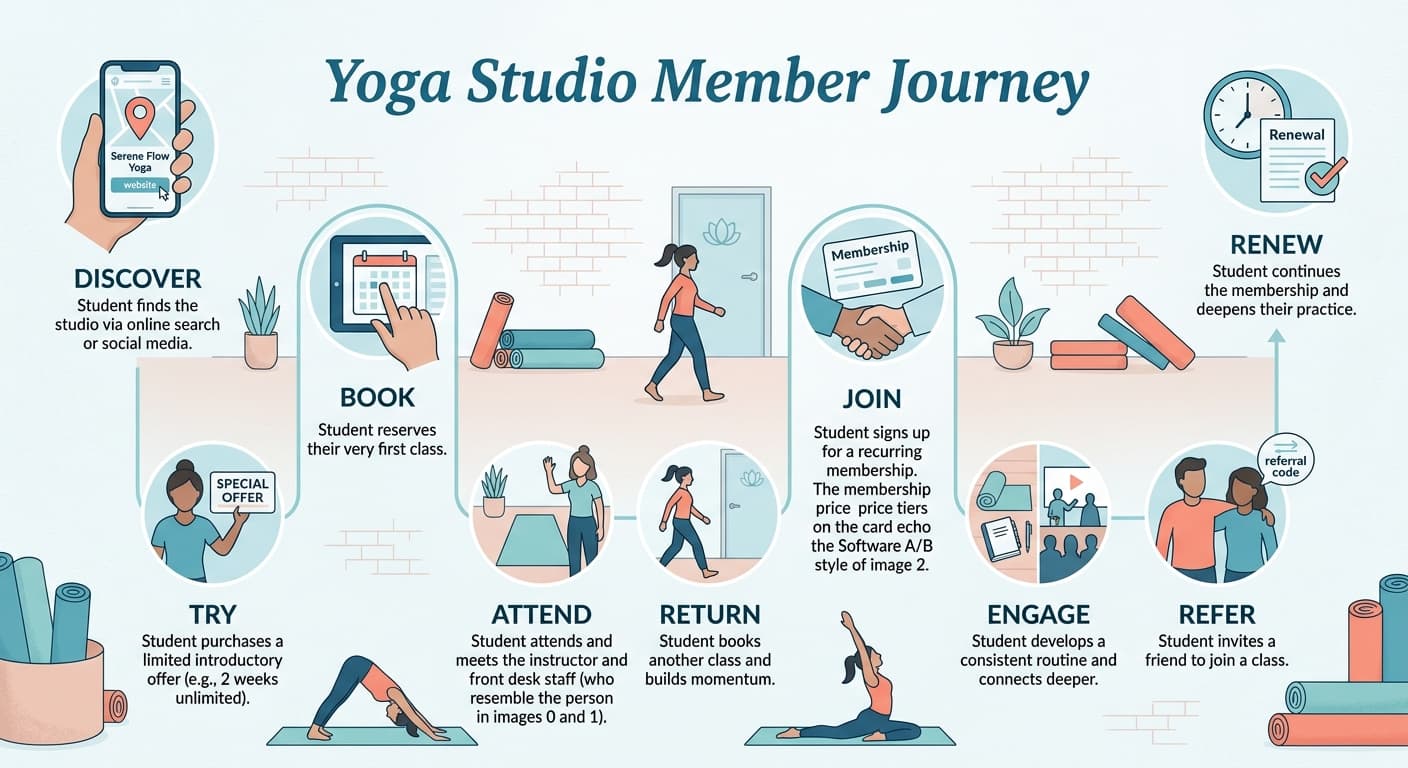
For example, if students regularly buy introductory offers but fail to attend again, you may need a better post-class follow-up process.
That might include asking about their first experience, recommending an appropriate next class, and helping them select a realistic weekly schedule.
If members attend regularly for three months and then disappear, you may need a better system for reviewing attendance and checking in before cancellation.
Your software should support those processes.
It should not force your studio to change the experience simply because the system cannot accommodate it.
Frequently Asked Questions About Yoga Studio Software
What Is Yoga Studio Software?
Yoga studio software is a platform used to manage the administrative and operational activities of a yoga business.
Depending on the product, it may include class scheduling, online bookings, memberships, payment processing, attendance tracking, instructor management, customer communication, marketing, and reporting.
Some platforms also offer websites, mobile apps, on-demand classes, loyalty programs, and community features.
What Is the Best Software for a Small Yoga Studio?
The appropriate software depends on the studio's business model and requirements.
Momoyoga, OfferingTree, and Vagaro offer options for independent instructors and smaller businesses.
A small studio that also wants structured engagement, attendance tracking, and member communication may consider Monstro-X.
The important factors are the features you need, the experience you want students to have, and the total operating cost.
How Much Does Yoga Studio Software Cost?
Yoga studio software pricing varies considerably.
Some platforms offer free subscription plans, while others start at several dozen dollars per month.
More comprehensive subscriptions can cost several hundred dollars monthly, particularly when advanced marketing, branded mobile apps, or additional services are included.
Payment processing fees and optional add-ons may increase the final cost.
Compare the complete pricing proposal rather than relying only on the advertised starting price.
Can Yoga Studio Software Manage Memberships and Payments?
Most of the platforms in this guide support memberships and payment collection.
However, the available billing rules and payment workflows vary.
Before purchasing, confirm that the software can handle your membership types, class packs, recurring payments, membership freezes, upgrades, and failed payments.
Can Yoga Studio Software Help Improve Member Retention?
Software can support retention by recording attendance, organizing communication, and helping staff identify members who may need attention.
Some platforms also offer rewards, community features, loyalty programs, and automated follow-ups.
However, software cannot guarantee that students will continue attending.
Your instructors, class experience, schedule, communication, and follow-up process still matter.
If you want to improve retention, start by understanding why members leave and how your studio responds when attendance begins to change.
Do I Need a Branded Mobile App for My Yoga Studio?
Not necessarily.
Students need a convenient way to view schedules, book classes, and manage their accounts.
A branded mobile app can provide those functions under your studio's identity, but it may involve additional subscription and setup costs.
For a smaller studio, a reliable mobile-friendly booking experience may be sufficient.
As your business grows, a branded app may become more relevant to your member experience and branding strategy.
Can I Switch Yoga Studio Software Without Losing My Member Data?
Many platforms provide data export or migration tools, but the process varies.
Member profiles, attendance records, class schedules, and payment information may need to be handled differently.
Stored payment methods can be particularly complicated because transfers depend on the payment processors and their supported procedures.
Before switching, ask your current and prospective providers what information can be transferred, what cannot be transferred, and who will be responsible for the migration.
The Right Software Should Make Your Yoga Studio Easier to Run
The purpose of yoga studio software is not to give you another dashboard to check every morning.
It should reduce the administrative work involved in running your business and make the student experience easier to manage.
That means fewer booking problems, clearer membership records, more consistent payment collection, better communication, and useful information about how your studio is performing.
Start with your real operating problems.
Then narrow your options to two or three platforms and ask each provider to demonstrate the same scenarios.
Do not let a polished demo distract you from the everyday situations your staff actually needs to handle.
And remember that the software only supports the system you build around it.
A student who stops attending still needs someone to notice and care enough to reach out.
A new member still needs a welcoming first experience.
A referral program still needs an experience that people want to share.
The right software makes those things easier to organize and repeat as your studio grows.
If you want to explore a platform that combines memberships, attendance, communication, rewards, referrals, and community features, take a look at Monstro-X yoga studio software.
Sources and References
The following official product and pricing pages were used to prepare this comparison.